
Okay, so iOS 27 dropped today.
And before you go, “oh great, another update” hear me out. Because this one actually hits different.
No gimmicks. No random features you will use once and forget. Just Apple making your iPhone feel better every single time you pick it up. Let me walk you through what changed.
The Lock Screen Looks Like a Whole New Phone
The moment you update and wake your phone you will stop and stare.
Apple moved the clock. That is it. That is the change. But because of that one move, your wallpaper now has so much more space to actually show up. Before, the clock was sitting right in the middle of everything. Now it steps aside and lets your photo do its thing.
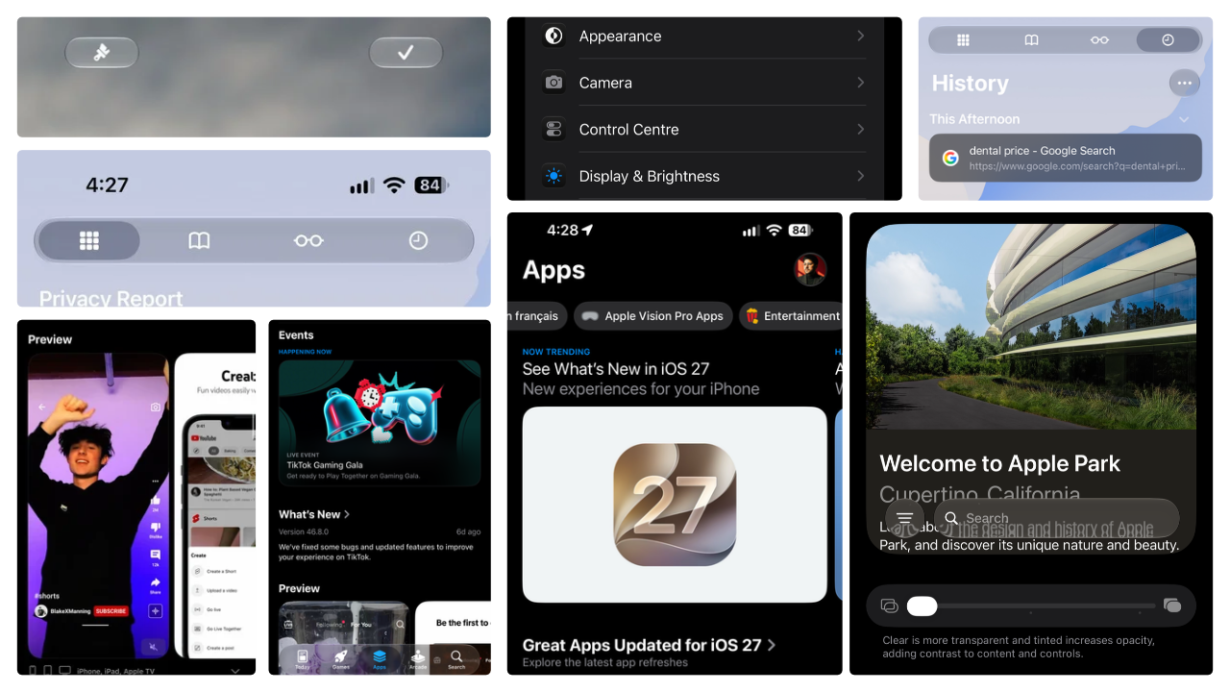
And you know that thing where the icons and text on your lock screen look too bright or too heavy against your wallpaper? You can now control how see-through they look. Apple finally gave us a proper slider for it, not just on or off, but actually adjustable.
It sounds small. But the first time you set it up and look at your lock screen, you will get it.
Your Home Screen Now Looks Like Glass
The bar at the bottom of your screen, the dock is now see-through. Like actual glass.
Apple even calls it glass now. And it looks really, really good. Your wallpaper shows through it, everything feels lighter, and the whole home screen just breathes more.
There is also a new button for the quick menu, the little menu that pops up when you swipe or tap in certain spots. It is clearer now, easier to find, and does not make you guess what it does.
Small change. Big difference in how the phone feels day to day.
Checking the Weather Takes Two Seconds Now
The Weather app used to make you scroll around to find what you actually wanted. Not anymore.
Now there are simple buttons right there on the screen for the three things everyone checks:
- How hot or cold is it?
- Is it going to rain?
- How windy is it?
One tap. Done. You can check the weather and put your phone down in five seconds. That is the goal, and Apple nailed it.
The Camera App Finally Makes Sense
Okay, this one is personal for me.
I have been using an iPhone for over 10 years. And every single time I opened the Camera app, something about it just felt off. Not the photos, the photos were always great. But the app itself always felt like it was designed for someone else.
iOS 27 fixed that.
Everything is where your brain expects it to be. You open the camera, and you just… shoot. You are not hunting for settings or accidentally tapping the wrong button. It is clean, it is simple, and it finally feels like it belongs on a phone this good.
If you ever picked up an Android phone and thought the camera app just made more sense, you need to try this update.
Settings Is Not Scary Anymore
Most people open Settings, feel immediately lost, and close it without changing anything.
That is changing with iOS 27.
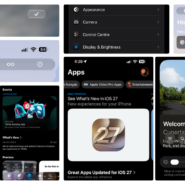
The layout is cleaner. The sections are easier to understand. And Apple added something called Liquid Glass transparency right in there which basically means you can control how that glass effect looks across your whole phone, all from one place.
They also added a Reduce Motion option front and centre. If animations on your phone ever make you feel a little dizzy, or you just want your phone to feel snappier this toggle is for you. Honestly, it should have always been this easy to find.
Your Calendar Now Works the Way You Think
Not everyone looks at their calendar the same way. Some people want a big picture view of the month. Some people want to see every detail of today. Some people just want a simple list.
iOS 27 gives you all four:
- Compact — small and clean, great when you just want a quick look
- Stacked — shows multiple things layered together
- Details — gives you all the info about each event
- List — just a straight-up list of what is coming up
Pick the one that works for your brain. Switch between them whenever you want. Apple finally stopped assuming everyone uses their calendar the same way.
The App Store Is Actually Fun to Browse Now
This is the one nobody is talking about but they should be.
Finding apps used to feel like digging through a messy drawer. Now the App Store has clean, clear categories. And inside those categories, there are sub-sections for both really popular apps and more specific, niche ones. So whether you are looking for something everyone uses or something a little more specific to what you do, it is easier to find.
Two things that stood out:
App events preview is more refined within the page. If an app you use has something coming up a sale, a new feature, a live event you will see it right in the App page.
Now bigger preview app look like more refined way before downloading it. Like actually see what it looks like (more refined app screen shoots) and how it works. Right there. Before you commit. This alone will save you from downloading five apps just to find the one you actually want.
AirDrop Is Faster Than Ever Like, Actually Fast
You know that moment where you are trying to send a photo to someone standing right next to you and AirDrop just… sits there? Searching. Connecting. Maybe working, maybe not.
That moment is gone.
iOS 27 made AirDrop noticeably faster. You open it, you see the person, you tap, it sends. No waiting around. No wondering if it is going to work this time. It just goes.
If you share photos, files, or links with people around you a lot this is the kind of thing you do not notice until it is fixed, and then you cannot believe you ever put up with the old version.
So How Does It All Feel?
Fast. Clean. Like a phone that just got out of the way.
I have been using iOS for a long time. Updates come every year and most of them make you go “okay cool“ and move on. iOS 27 made me go “oh, they actually thought about this.“
Every change has a reason. Nothing feels random. And the whole phone just feels more put together, like all the different parts finally agree on what they are supposed to look like.
Performance is solid too. No slowdowns, no weird bugs on day one. Just a phone that works the way it should.
Should You Update Today?
Yes. Right now. Go do it.
There is nothing here that should make you nervous about updating. It is stable, it is fast, and the changes are the kind that make you wonder how you used your phone without them.
Already updated ? Tell us what you noticed first, drop it in the comments. For more real, no-nonsense tech coverage follow @theiconicanand on Instagram and read more at TheSiliconThreads.com